Billing
Plan and trial, monthly quota, automatic extra packs, invoices and payment methods.
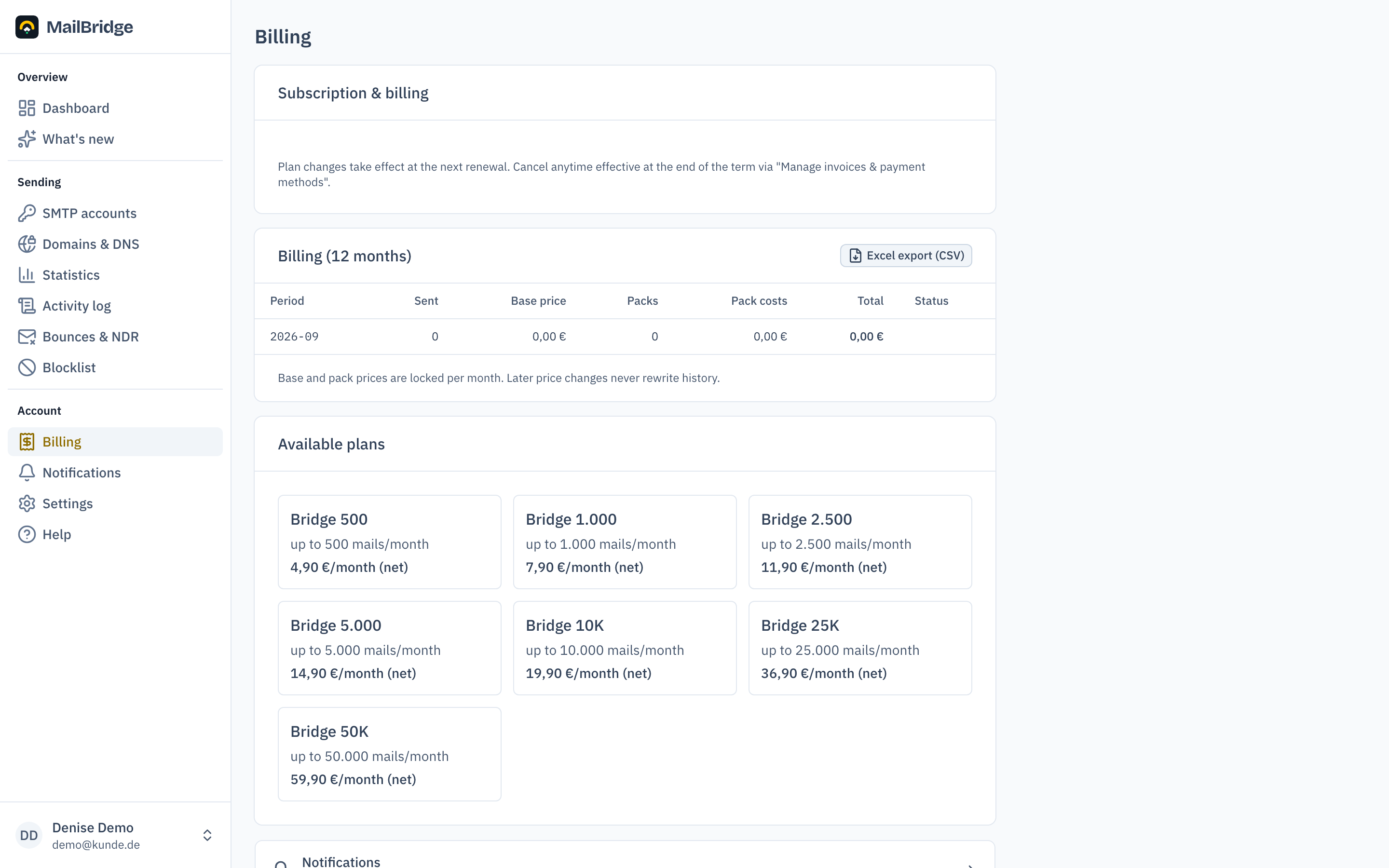
Under Billing you see your plan, the usage of the current month, and manage payment and invoices.
Trial
After registering you can try MailBridge before payment is set up. How long and with how many mails depends on the account type:
| Account type | Trial | Trial mails |
|---|---|---|
| Direct customer (Bridge) | 14 days | 100 |
| Agency | 30 days | 500 |
Agencies get more time and volume because coordinating with end clients and getting access to their DNS takes longer. During the trial you can create up to three client projects; once a plan is chosen that limit disappears.
Set up payment & start trial begins the trial with the full quota of your plan; billing starts only after the trial ends.
Quota and extra packs
Every plan includes a monthly mail quota. If you need more in a given month, an extra pack is billed automatically for each started pack size and sending continues without interruption. Only at the extra-pack limit is sending paused; you can then release further packs from the dashboard or change the plan.
If that happens repeatedly, the portal shows you which plan is cheaper at your volume. A larger plan applies immediately, and only the difference is charged for the rest of the month. A smaller one takes effect at the next billing date, so the volume you already paid for stays available until then.
Invoices and payment methods
Manage invoices & payment methods opens the payment portal of our billing provider Stripe. There you download invoices, change the payment method and, if needed, cancel at the end of the term. How to revoke a cancellation is explained under Coming back after a cancellation.
The payment page shows which payment methods are available to you when you set up payment. If you pay by SEPA direct debit, you grant the debit mandate there, and Stripe announces every debit to you by email beforehand. A debit takes a few business days to be confirmed. Your plan applies right away regardless. If you return a debit through your bank, we treat it like a chargeback.
When a payment fails
If a charge does not go through, you get an email right away and the dashboard shows "Payment past due". Your sending then continues unchanged for seven more days. During that time our payment provider retries the charge several times. On the day the period ends, we remind you once more.
Add a valid payment method under Manage invoices & payment methods. As soon as the invoice is paid, everything resumes right away. If it is still open after seven days, the server accepts no further mail. Your application then receives a temporary rejection and keeps the mail in its queue, so nothing is lost.
A chargeback does not get this period. If you reclaim a payment through your bank, we write to you at once and block sending 24 hours later. The mail and the billing page contain a link to settle the amount again. Sending resumes as soon as that amount is paid and no subscription invoice is open. If the chargeback was a mistake, just reply to our mail.
Monthly usage report
Optionally MailBridge sends you an email at the start of the month with volume, bounces and quota of the previous month. The switch for it is under Notifications, together with the warnings about quota, paused sending and DNS.
Twelve months of billing
Below the current usage sits the billing of the last twelve months: period, mails sent, base price, extra packs and total, exportable as CSV for Excel. Base and pack prices are locked per month, so later price changes never rewrite history. The same months as pure volume are shown under Statistics.
What happens after a trial or a cancellation
When the business relationship ends, your account first goes dormant and is deleted afterwards. We announce that beforehand, twice and with the date.
After a cancellation everything continues unchanged until the end of the paid period. After that sending stops, but you keep your portal login: you can reach your logs and save whatever you want to keep. 90 days after the end of the contract the account is blocked and marked for deletion, and deleted seven days later.
After a trial without a booking the same applies with a shorter deadline: 30 days to the block and the marking, then seven days to deletion.
A booking cancels the marking. If you book during that time, your account stays intact in full, including accesses, domains and settings. Only what was announced beforehand is ever deleted. How to book is explained in the next section.
Your invoices sit at Stripe and remain available there. They have their own statutory retention periods; deleting your portal account does not touch them.
Coming back after a cancellation
You canceled and want to stay after all? You can do that yourself under Billing, without contacting support. Which way applies depends on whether your subscription is still running.
The subscription runs until the end of the term. The top of the page then says "Your subscription is canceled as of …". One click on Revoke cancellation is enough, and your subscription renews as usual. There is no extra charge, plan and price stay the same. If we sent you a discount code, it is deducted automatically from the next invoice.
The subscription has already ended. The page then says "Your subscription ended on …". The button Book … again carries the name of your previous plan and books it again. Book on one of the plan cards picks a different one instead. Both lead to the Stripe payment page. There is no second trial, and sending resumes right after the booking. If we sent you a discount code, it is already applied and deducted automatically.
In both cases your account is exactly as you left it: accesses, domains and settings are still there. Any announced deletion is cancelled.
For agencies
Agencies additionally see usage per client for the current month and the proportional cost per client, exportable as CSV for Excel. Details in MailBridge for agencies.
You will find this feature in the customer portal: my.mailbridge.email, included in every plan.
No account yet? Try it free for 14 days, payment details are only needed afterwards.
Diese Seite auf Deutsch: deutsche Fassung