Domains & DNS
Add and verify sender domains, set up SPF/DKIM/DMARC with a found/expected comparison.
Under Domains & DNS you manage your sender domains and see for each one whether the DNS records are correct. Every domain has a card with the state of SPF, DKIM and DMARC.
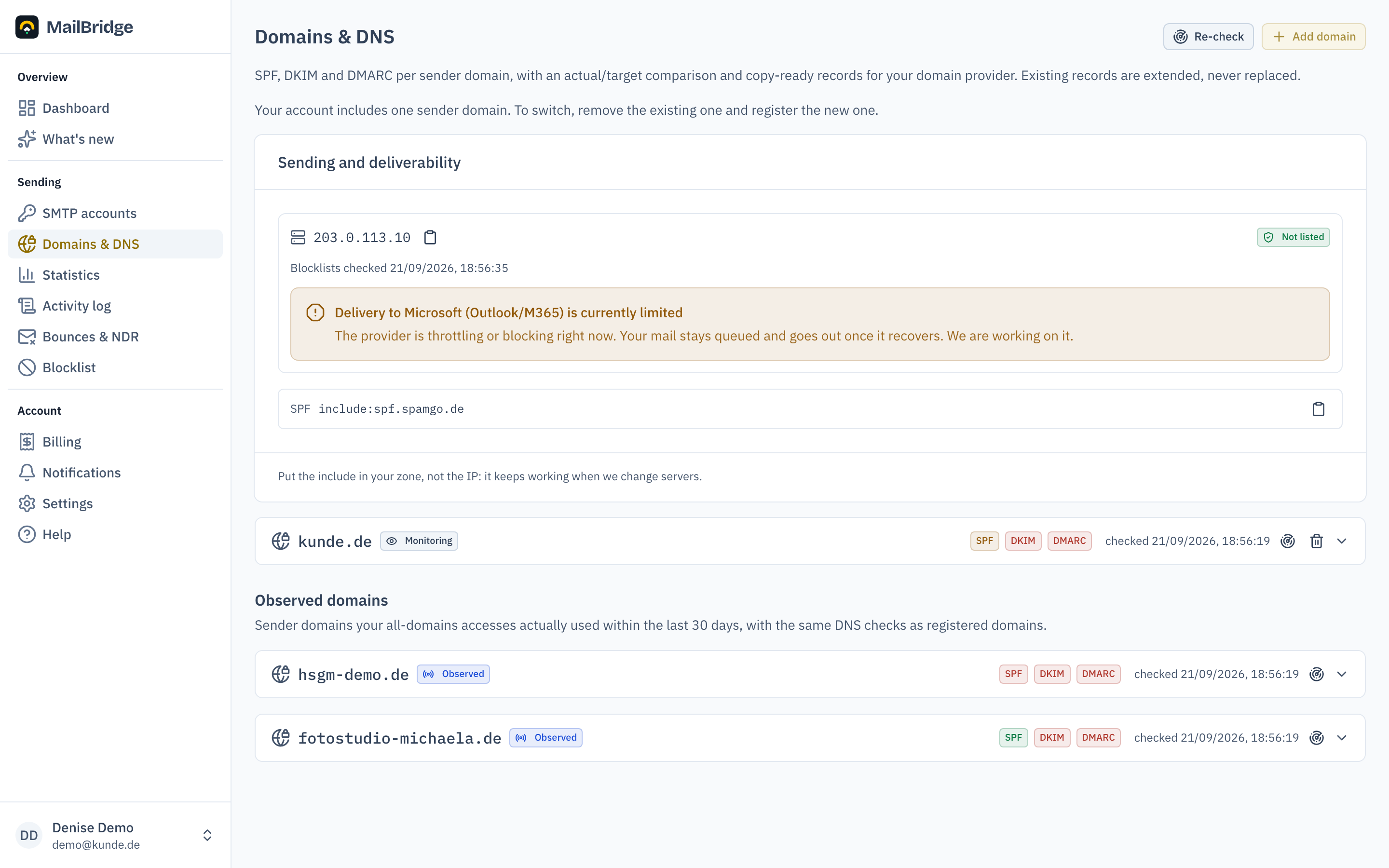
Adding and verifying a domain
Add domain registers a new sender domain. You prove ownership via a TXT record (mailbridge-verify=…) in the domain's DNS; only then is the domain enabled on the server. If the domain matches your registration address, no proof is needed. The full walkthrough is in the getting-started guide.
How many domains
A Bridge account has one sender domain. In an agency account every client project carries its own. If your account holds several domains from earlier plans, those stay; new ones are no longer added.
Switching a domain
To switch, remove the existing domain via the bin icon on its card, then register the new one. Important: accesses that send from the removed domain are rejected right away. Sending resumes once the new domain is registered and verified via DNS. Plan the switch for a quiet time and set up the new domain's DNS records beforehand.
Found/expected comparison
For each of the three record types the card shows the record currently found and the expected one, with copy buttons for host, type and value. Copy the expected values to your domain provider, then click Re-check.
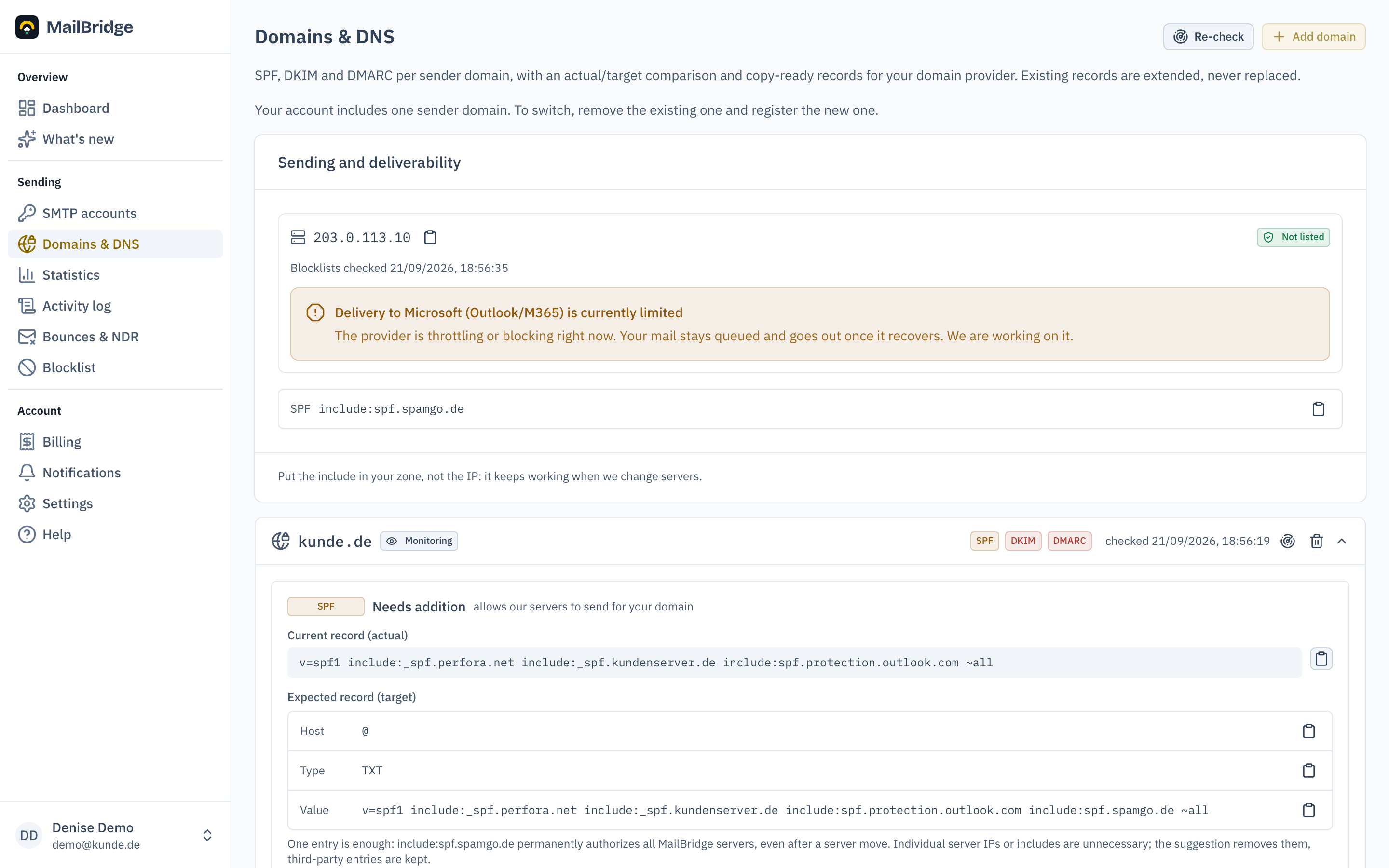
The three records in short:
- SPF allows our servers to send for your domain. A single record with
include:spf.spamgo.deis enough and survives server moves. The suggestion amends your existing SPF record instead of replacing it. - DKIM cryptographically signs every mail. If your accesses send via several servers, the card lists several DKIM records. Create all of them.
- DMARC tells receivers how to treat forged mails of your domain. If your policy is
p=none, the portal suggests upgrading top=quarantine.
Allowing other senders in SPF
If another service sends mail with your domain besides MailBridge, such as Microsoft 365, Google Workspace, a newsletter service or your own web server, it has to be in the SPF record too. Otherwise recipients treat its mail as forged.
For that, the SPF row of the domain card has the button Allow other senders. It opens a builder that has already taken over your current record:
- Services with their own SPF record go in as an include, exactly as the service's setup guide says. Microsoft 365 and Google Workspace have quick-add buttons.
- Your own servers go in as host names, as IPv4 or IPv6 addresses or as whole networks, one entry per line.
- Under All other senders you decide what happens to the rest.
~allis a good start; once every sender is listed,-allis the stricter choice.
The MailBridge include is always part of the record and cannot be removed, since sending via us would break otherwise. The builder flags wrong entries while you type.
Clicking Check counts the DNS lookups the new record costs, including the includes inside the includes. Recipients allow no more than ten; beyond that the whole record counts as an error. The check also shows where the lookups go, and the finished record ready to copy.
The portal stores nothing. You set the record at your DNS provider yourself, in place of your current SPF record: two SPF records for one domain count as an error. Then click Re-check.
Graded report
Below the three status lights sits the full report: a grade from A to F, the number of errors and warnings, and below that the findings in plain words, errors first and confirmed points last.
It is the same check the public DNS tool offers every visitor, with one advantage: for your own domains we know the actual DKIM selectors of your accesses. The public tool has to guess them and never finds a custom one.
More is checked than the status lights show: the lookup budget of your SPF record and loops in its includes, test mode and pct on DMARC, the key strength of your DKIM records, plus the MX records.
The report is produced in the nightly run and when you click Re-check, not on every page view, because it costs up to sixty DNS queries per domain. If a domain has none yet, that means "not checked yet", not "nothing found"; the status lights are there regardless.
Sending and deliverability
Above the domain list you see which IP sends for you and how it is doing:
- whether it is on a blocklist. If it is, we take care of the delisting, there is nothing for you to do.
- whether a large provider is currently throttling or blocking. Your mail stays queued meanwhile and goes out once it recovers.
- whether the IP is in its warm-up phase, with the limit per hour and day. This is the answer to "why is my mail hanging": a new sending IP has to ramp up slowly, otherwise recipients treat it as suspicious.
Next to it sits the SPF include, ready to copy. Put the include in your zone, not the IP: it keeps working when we change servers, the IP does not.
Automatic monitoring
MailBridge checks all domains once a day. If a record breaks later, say after a change at the domain provider, it shows up on the dashboard under "Needs attention" and, if you want, by email (see Notifications). DNS changes can take up to 24 hours to become visible everywhere.
Domain binding
Each domain has a binding mode: with monitoring, mails with foreign sender addresses are only logged; with enforced, the server accepts sender addresses of this domain only. A compromised access can then never send in the name of foreign domains.
You will find this feature in the customer portal: my.mailbridge.email, included in every plan.
No account yet? Try it free for 14 days, payment details are only needed afterwards.
Diese Seite auf Deutsch: deutsche Fassung